01
Scale any window
Point Magpie at any windowed app and it renders a clean, full-screen image in real time. Games, emulators, ancient desktop software — if it draws pixels, it can be upscaled.
Free & open source
Magpie captures a window, upscales it with FSR, NIS, Anime4K or a dozen other algorithms, and throws it full-screen — crisp detail, zero subscriptions.
Why Magpie
One lightweight app between your game and your monitor. No overlays, no injected DLLs, no nonsense.
Point Magpie at any windowed app and it renders a clean, full-screen image in real time. Games, emulators, ancient desktop software — if it draws pixels, it can be upscaled.
FSR, NIS, Anime4K, xBR, Lanczos, Bicubic and more. Tune sharpness, denoise and effects per profile, or let sensible defaults do the work.
Every app remembers its setup. Auto-scale when a window comes into focus, toggle with a hotkey, and keep your desktop exactly as it was.
Showcase
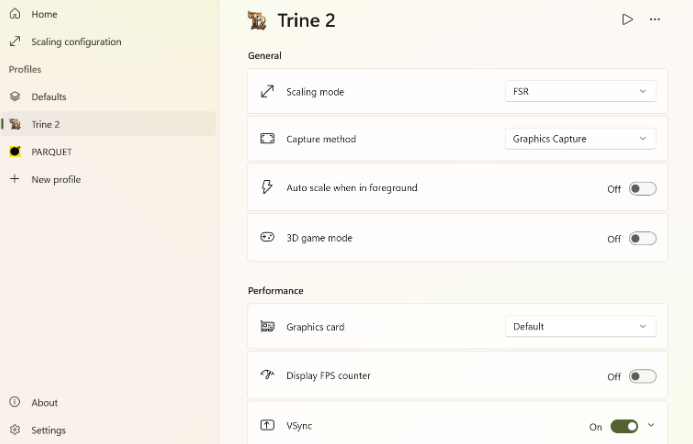
Every capture method, scaling mode and performance switch lives in one tidy panel. Pick a profile, see the change instantly, get back to the game.
How it works
Borderless windowed is perfect. Exclusive fullscreen can't be captured, so flip that one setting in-game.
Choose a scaling mode, capture method and output resolution. Magpie remembers your choices per app.
Press the scaling shortcut and the window fills your display. Press it again to go back. That's it.
Specs
Magpie runs on the DirectX 11 pipeline and stays out of the way until you call it.
They overlap on upscaling but aren't the same tool. Magpie is free and open source and focuses on window upscaling. Lossless Scaling also ships frame generation (LSFG); Magpie doesn't generate frames.
Any game that can run in windowed or borderless mode can be captured. Exclusive-fullscreen titles need to be switched to windowed first.
Yes. Magpie is open-source software licensed under GPL-3.0. Grab the latest build with the download button above — no account, no trial, no upsell.
No. Magpie is a pure upscaler. It improves clarity and fills your screen; it doesn't interpolate frames or change your frame rate.
Get started
Download the latest portable build, point it at a window, and press play.
Build updated November 2026
Windows 10 / 11 · 64-bit · Portable RAR · No account required